BRING YOUR BOOKS
Import your Goodreads, StoryGraph or Babelio library
After spending time logging your books, changing apps can feel like starting all over again. Before entering titles one by one, retrieve your existing library. Read Today can import a Goodreads, The StoryGraph or Babelio export, as well as a CSV file.
Get a copy of your library first
Sign in to the service where you keep your library and find its export area. Official links are included below. Download the file and keep an untouched copy somewhere you can find it again.
You do not need to open and save the CSV in a spreadsheet before trying it. If you decide to edit it, work on a copy so that you can return to the original if something stops looking right.
Give the preview a moment
Open data import in Read Today, choose the matching service and select the file saved on your device. The app prepares a preview before you confirm.
Look at a few books you know well. Are the titles correct? Have the details in the file been recognized? Check duplicates too, especially if you have already added books to Read Today.
The result depends on what your previous service includes in its export. Missing information cannot always be recovered. If a book looks incomplete, compare it with its row in the original file before importing the whole library again.
After importing, find your current read and check a few other titles. Organizing everything can wait until you know how you like using the app.
Keep the original export even if everything looks correct. For future copies, ReadToday Plus also offers CSV exports of your library, sessions and lists, along with PDF reading reports.
If you want to use the move to organize your TBR list, start with a few books you want to find again soon. The rest can wait.
IN READ TODAY
A preview before moving your library
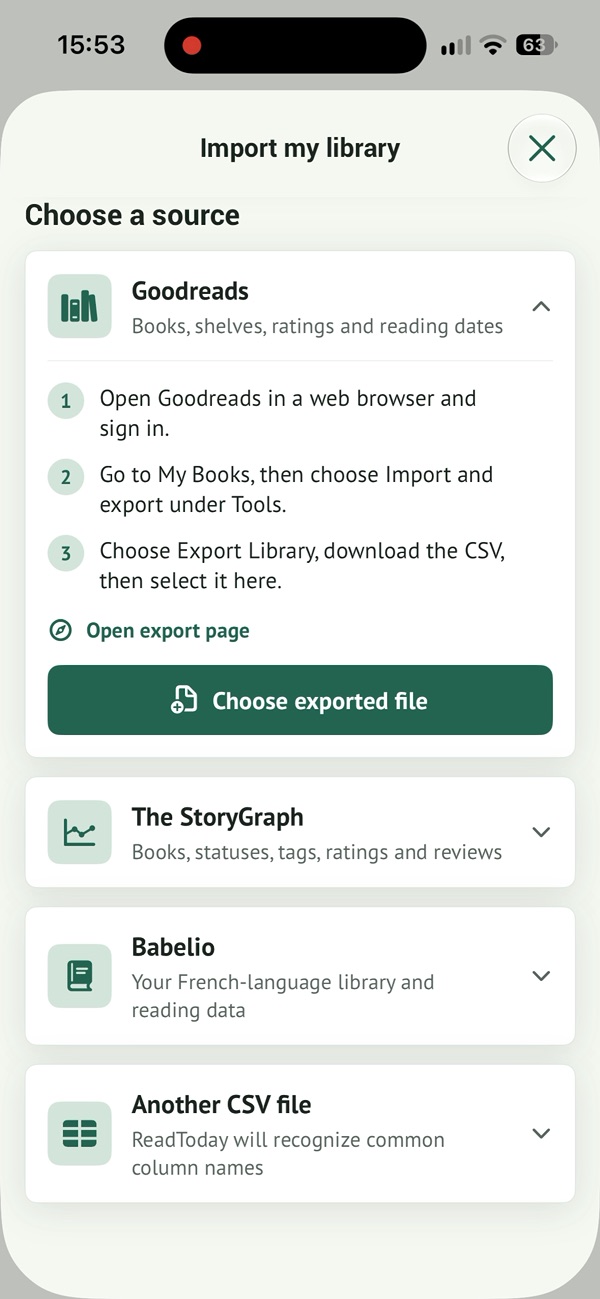
Choose the original service on this screen. The CSV file comes next: check the books in the preview before confirming. Your original library remains available.
Real app screenshot, interface in English.
To see these ideas in the app, explore our Goodreads import in Read Today.
Official export pages
A book, a few pages, a little time for you.
Read Today helps you organize your books and track your reading at your pace. Meet the app or add your first book.
Free to download · In-app purchases