WORDS THAT STAY
How to save quotes from books and find them again
A sentence stops you. You read it twice, decide you will remember it and carry on. A few days later, only the general idea remains. You cannot quite find the words, or even the page.
Start with whatever is within reach: a scrap of paper to mark the place, a photograph, a few words in a note. You can copy the passage later if you want. For now, make it possible to return without interrupting the whole reading session.
Alongside the quote, keep the title, author and a reference within the book. A page helps if you have the same edition; a chapter can help when switching formats. A photograph by itself in your phone gallery soon becomes difficult to identify.
Leave a few words of your own
The line may have meant something particular to you that day. Note it briefly: it reminds you of a conversation, puts an idea into words or simply sounds wonderful read aloud.
You are helping your future self remember a reaction. A passage labeled “send this to my sister” already has a context that an isolated screenshot does not.
If you write from memory, say so. Keeping the idea in your own words is better than attributing an approximate sentence to an author as an exact quote. Return to the text when you can.
Before saving a whole page, consider which part you actually want to find again. One or two sentences may be enough. If a tool extracts the text, read it through: a mistaken word or punctuation mark can alter its meaning.
Visit your saved passages occasionally. You might connect one with another book, share it with its reference or want to open the original again. There is pleasure in that second encounter too.
When sending a passage to a friend who has just started the book, talking about books without spoilers also means checking what the quote reveals.
IN READ TODAY
Make a place for the words
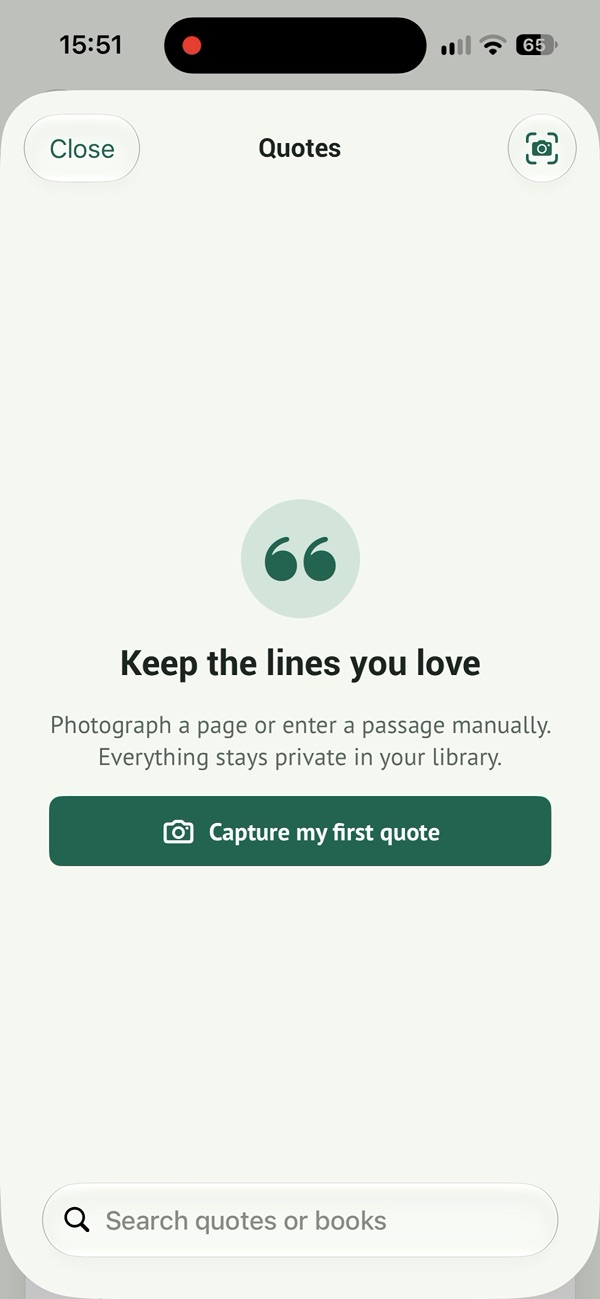
The quote library keeps your passages together. After taking a photo, check the recognized text and keep a book reference. Capturing the text is a start; reviewing it makes it useful.
Real app screenshot, interface in English.
To see these ideas in the app, explore our book quotes in Read Today.
Find your favorite passages again.
Read Today can extract text from a photograph so you can correct it and keep quotes alongside your books.
Free to download · In-app purchases