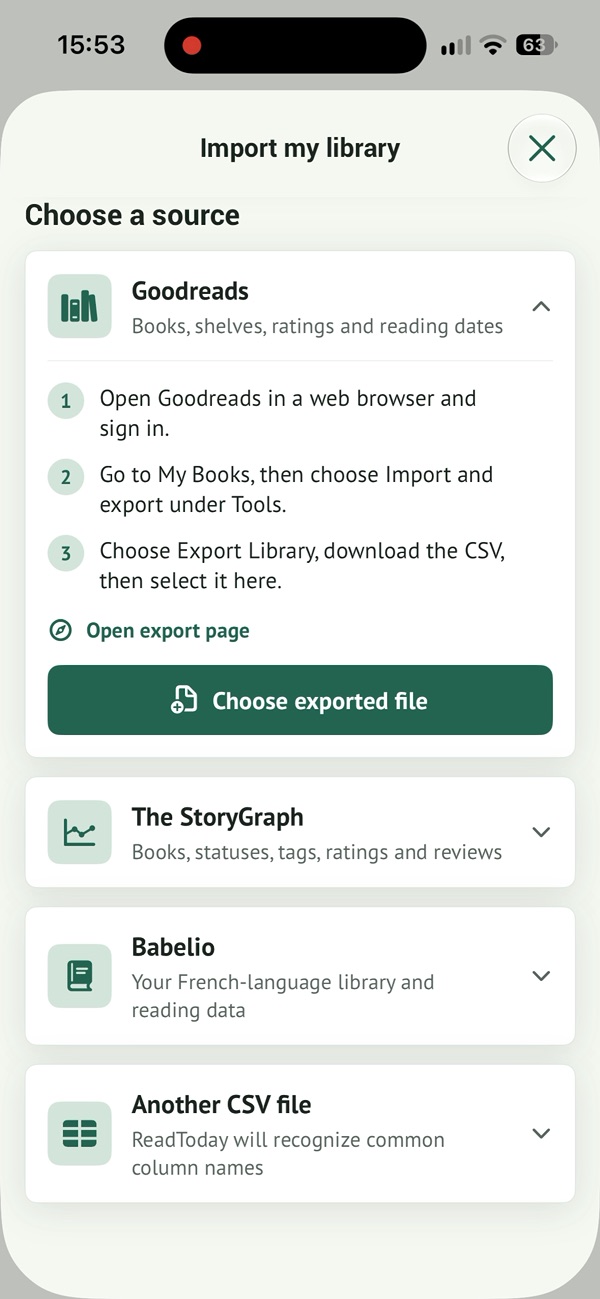
Import your Goodreads library into Read Today
Get your Goodreads file
On the Goodreads website, open My Books, then Import and export, and request a library export. Save the CSV in Files on your iPhone. Keep a copy of the original file as well.
Open Goodreads export ↗Open the import in Read Today
Choose Goodreads as the source, then select your exported file. Review the recognized books in the preview before confirming. You can also import from The StoryGraph, Babelio or another CSV file.
Take a moment to check
Compare a few titles, statuses and available dates with your original library. The result depends on the information in the file. Review suggested duplicates and editions: different editions of a novel are not always interchangeable.
What if the file does not look right?
Avoid editing the CSV at random: spreadsheet software can change dates or separators. Try a copy of the original export, check your selected source and contact us if you get stuck. Keep your old library until you have checked your data.
How to prepare a library import and keep your data ↗
Bring your books to Read Today
Free to download · In-app purchases
Scan with your iPhone camera to find the app.