A LITTLE TIME FOR YOUR NEXT CHAPTER
Keep your books close.
Find your reading rhythm.
Your library, your progress and your favorite quotes in one app. Keep track of your reading, at your own pace.
Your reading tracker for iPhone and iPad.
Free to download · In-app purchases
No account to get started. Always at your own pace.
Scan with your iPhone camera to find the app.
Make it your moment.
A PLACE FOR EVERY STORY
Less organizing.
More reading.
Your library deserves more than a forgotten list. Keep what you’re reading, what you’ve loved and what comes next together.
Your whole library, together.
Search for a title, scan a barcode or add a book manually. Organize your books in lists, from future reads to all-time favorites.
Every page counts.
Log your pages and see your progress. Plan a finish date or simply let your reading find its own pace.
Keep the words that stay.
Photograph a passage to extract its text. Save your favorite quotes and turn them into cards to share.
TAKE A LOOK INSIDE
One small moment.
A little room to read.
Explore the small details that accompany your reading.
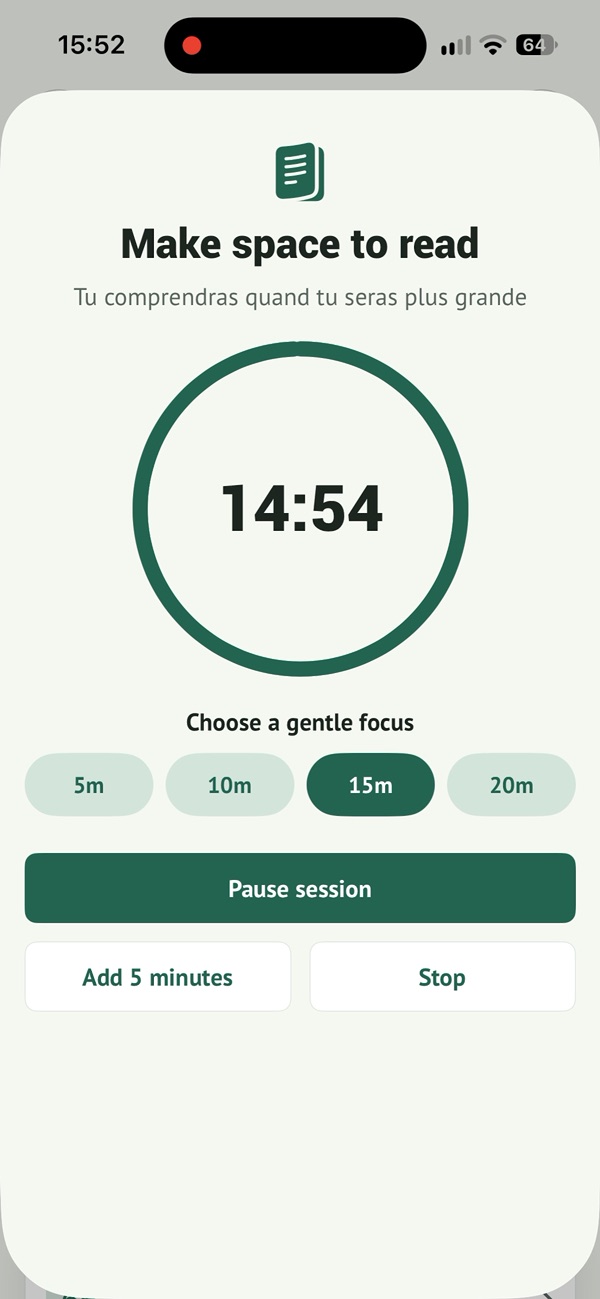
Find your focus
A little time for your book
A chapter before bed or a few pages between appointments. Choose the time you have, then make a little space for your book.
See your progress
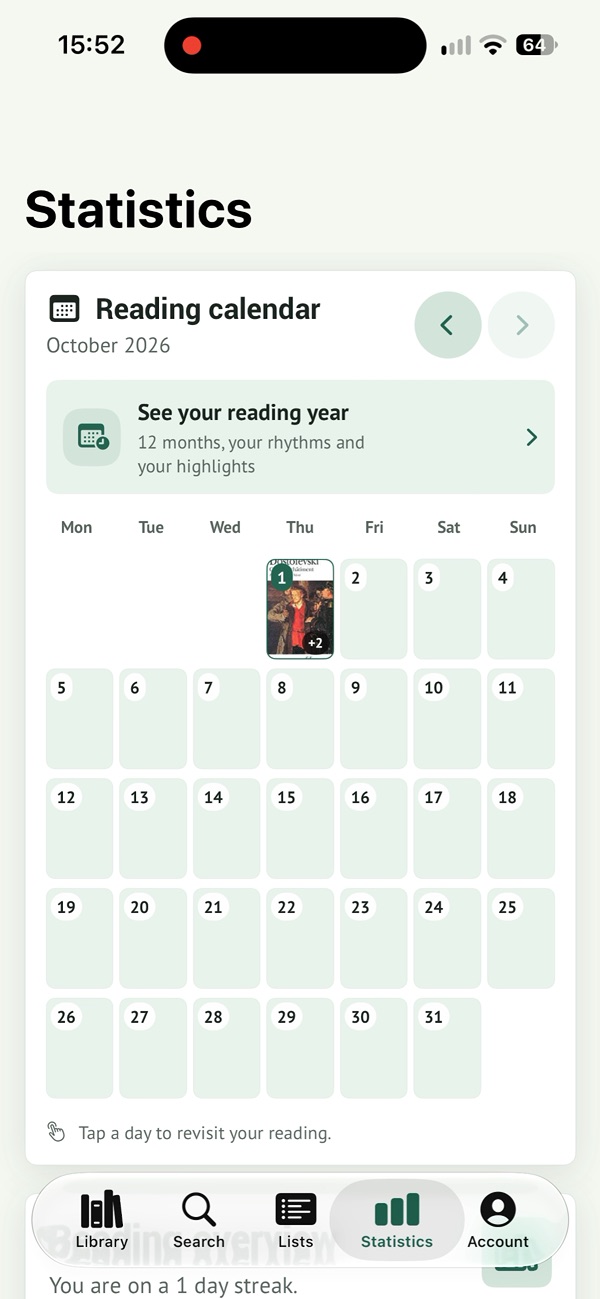
See your reading days
A few pages one day, a finished book another. Your calendar keeps those moments together so you can look back on your reading.
Bring your books
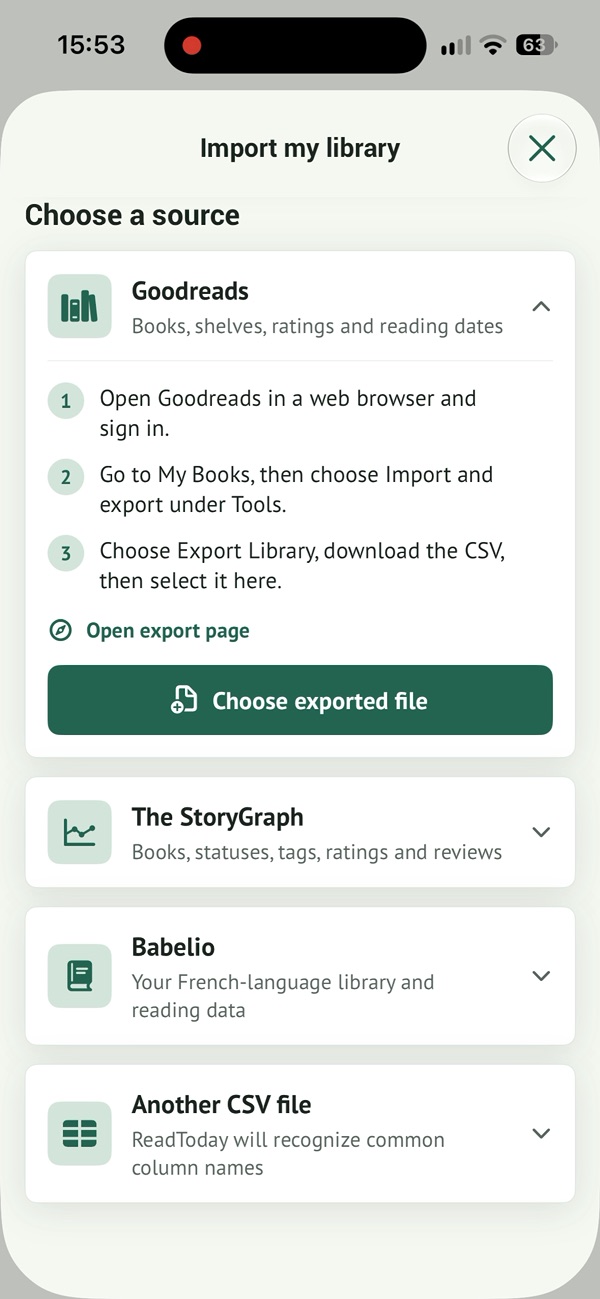
Bring your library along
Your reading ideas, finished books and next discoveries. Bring your existing library along with an import from your usual service.
Real screenshots of the app in English.
18 SECONDS IN THE APP
From your first book
to your next page.
Three moments using Read Today, taken from a real recording of the app.
- 00:00Choose a book
- 00:06Start a session
- 00:12Save your progress
Three edited clips, without audio. Interface in English. The reading session is shortened for the demo.
FOR THE JOY OF IT
A little ritual.
Never a chore.
Five minutes on your commute. A chapter before bed. With a focus timer and reminders that fit your day, make a little room for reading.
- A daily goal, or the freedom to read without one
- A calendar to look back on your reading days
- Reading stats to appreciate how far you’ve come
A little reading adds up
What could a few pages a day look like?
A simple illustration, never a race to read more.
 Read Today
A NEW APP. THE SAME READING STORY.
Your books come
along with you.
Already have a library on Goodreads, The StoryGraph or Babelio? Bring it into Read Today with a CSV import, preview your books and avoid duplicates.
How to import your library ↗A little more insight
into your reading.
Start for free. When you want to explore your habits and keep your reading recaps, the optional ReadToday Plus subscription takes you a little further.
Explore the app and its Plus offers ↗Current plans and pricing are shown in the app.
Your full reading story
Annual calendar and complete reading history.
A closer look at your rhythm
Advanced statistics and personalized reading recaps.
Lists that fit your books
Unlimited custom lists to organize your library.
Memories to take with you
CSV exports and a PDF reading report.
FIND YOUR STARTING POINT
What would you like
to keep?
BEHIND READ TODAY
An app, its maker.
And your feedback.
Read Today is developed by Mickaël Lokhate. Have a question about the app, an idea for your reading routine or something that gets in the way? You can write directly to its creator.
Write to Mickaël ↗THE READER’S CORNER
Little ideas.
Lasting habits.
EVERYDAY READING · 3 MIN
Reading on your commute: making room for a book between stops
Find a practical way to read on a train, bus or subway, choose a convenient format and return to your book despite interruptions.
Read the guide ↗SHARING YOUR READING · 3 MIN
How to talk about a book without spoiling it for someone else
Recommend a novel without revealing its surprises. Talk about atmosphere and your reading experience, and agree how much detail to share.
Read the guide ↗A YEAR IN BOOKS · 3 MIN
How to make a reading year review that remembers more than totals
Look back on your reading even if your notes are incomplete. Recover your book list, choose meaningful memories and make room for more than finished-book counts.
Read the guide ↗One more little question?
Is Read Today free?
Read Today is free to download with in-app purchases. You can start tracking your books for free. ReadToday Plus unlocks features including advanced insights, personalized recaps and CSV / PDF exports.
Do I need an account?
No. Start without an account and keep your library on your device. You can create an account later to back it up.
Can I import my Goodreads or Babelio library?
Yes. Import from Goodreads, The StoryGraph, Babelio or a CSV file. Preview your import and avoid duplicates before adding your books.
Can I read ebooks in Read Today?
Read Today organizes your books and tracks your reading. It is not an ebook store or reader. Keep reading your books in whichever format you enjoy.
Which devices are supported?
Read Today is available for iPhone and iPad with iOS 17 or later, in English and French.
Can I export my data?
ReadToday Plus lets you export your library, sessions and lists as CSV and create a PDF reading report.
Your next chapter
starts today.
A book, a few pages, a little time for you.
Free to download · In-app purchases
Scan with your iPhone camera to find the app.